What Is a Headless CMS? A Business-Friendly Guide
A headless CMS separates your content from how it is displayed — giving you more flexibility, better performance, and stronger security than traditional platforms like WordPress. Here is what that actually means for your business.
If you have been looking around the web, you have probably come across the term "headless CMS", or just "headless" generally. It's a concept you'll hear a lot, and you may wonder what it actually means, or why it matters to your business.
So let's go over what it is, and how it compares to standard CMS platforms like WordPress, and what are the pros and cons to both.
Key Takeaways (TL;DR): A headless CMS separates content management from content display. You have a backend with your content (articles, writing, media), while the frontend (the "head") is seperated from the backend, as opposed to being joined in one system, a full body you can say. This gives you opportunities to better tune the "head" for performance and allows more creative freedom. So a "headless CMS" is built around being flexible enough to add any "head" to it.
Traditional Coupled CMS
You're probably familiar with Wordpress, around 60% of the internet runs on it. With a traditional CMS like WordPress you get the whole package, the backend UI dashboard with the front-end website directly built into it.
The backend dashboard: where your team writes blog posts, uploads images, and organises pages.
The front-end page: how that content is displayed to visitors on your website.
In WordPress, these are the same system. The content is stored in a WordPress database, WordPress renders the front-end HTML pages that visitors see. The theme defines how the webpage looks, and plugins add functionality.
This model is extremely popular, it works, but has limits.
- Performance: WordPress generates pages when the user visits them, it's slower than serving pages pre-generated on the server that you get with Next.js.
- Security: WordPress is the most-targeted CMS on the web because of its massive market share. Each plugin, if not maintained, can become a vulnerability.
- Design: What is easy to get started with ends up becoming what constrains you. If themes or page builders can't do what you want, you either have to give up or patchwork something together that often effects performance or results in unsatisfactory UI/UX.
- Flexiblity: Your content is inside WordPress and can only be displayed on a WordPress site. Want to output to a mobile app or a digital kiosk? Things can get tricky.
The Headless CMS
A headless CMS decouples the two parts.
The Body: A backend interface where your team can write, modify and organise content. Served from a cloud service like Contentful or Sanity provide, or a open-source solution like Payload CMS. It might be similar in design to something like Wordpress, or highly customised to your business needs. It could be provided to you on a monthly fee, or it could be something your developer or team self-hosts on a local server or one that you rent.
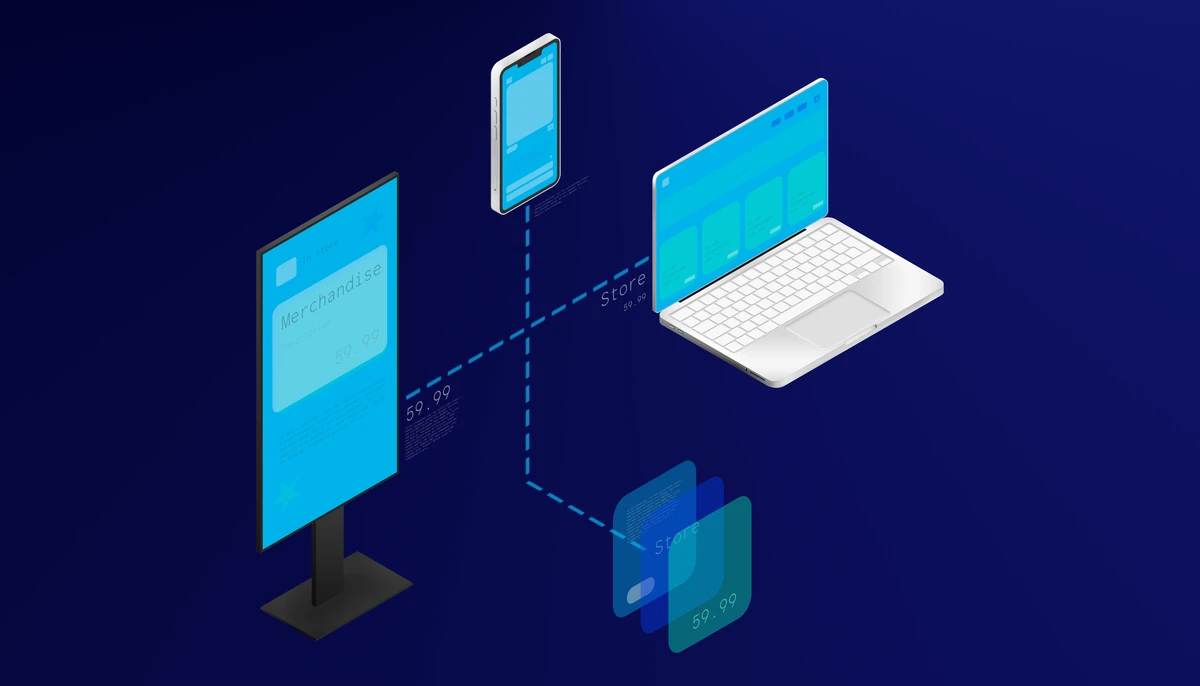
The Head: Wherever you need to display your content, it's pulled from the CMS via an API (an application programming interface, a way for different software to talk to each other). This could be a website, a mobile app, a digital signage display in your store, or multiple front-ends all using the same content. This is where the "headless" system shines.
The "Headless" CMS is not really concerned how the content is displayed, or how it is used. It just provides the backend connectors to plug whatever you need into it. The front-end display, for example the website, isn't hard wired to the CMS "headless" backend. Its only concern is how it can fetch the information it needs to render to whatever screen it displays on.
This separation is what makes the approach powerful, scalable and maintainable.
Why Businesses Choose a Headless CMS
Better Performance
With a "traditional" CMS like Wordpress, every time the user loads a page, a request is made to the database and the page is generated on the fly (dynamically). With a headless CMS, combined with a modern framework like Next.js or Vue.js, pages are pre-generated on the server and provided to the user as static files, not built on the users machine. The result dramatically noticeable faster load times, which makes for a great user experience.
Users are expecting pages to load quickly, faster load times lead to better conversion rates, and in turn better search engine rankings - Google promotes faster-loading sites higher in their search results.
Better Security
The headless route separates the content management interface from the public-facing site. The front-end doesn't have such a close relationship with the database, and the CMS is equally more isolated from public traffic. As a result this dramatically reduces the attack surface, and if problems do occur they are easier to isolate.
In a traditional CMS like wordpress, the public-facing site, the admin panel and every plugin sit closely together in the same codebase.
Complete Design Freedom
With an independent frontend, there are no constraints when designing the website. You can tailor it to the exact needs and requirements of the business or organisations design strategy. You are not reliant on a 3rd party developer and you can use the latest web technologies natively. No more reliance on plugin providers, or hacking workarounds to fit your needs.
This is very valuable for businesses that want to differentiate themselves or need to stay ahead of the competition.
Multi-channel Content
As we previously mentioned, a headless CMS can be connected to multiple front-end displays. Your blog posts appear on the website, the mobile app, a weekly email newsletter or on a digital display in your store. Having your content distributed from a single soruce and across multiple front-ends is ideal for businesses at scale, or is great for future proofing for smaller businesses earlier in their journey.
Developer Experience
For developers, working with headless CMS platform is significantly more efficient. Traditional systems are great for users with limited technical skills but are a huge bottleneck for developers. The result is higher productivity, quality of work and happier developers.
The Trade-Offs
A headless CMS is not always the ideal solution, there are ofcourse trade-offs.
More upfront work: The traditional CMS provides you a working site very quickly. Going headless requires building the frontend from scratch. Naturally this takes time and investment upfront.
Developer dependency: You need a developer you can trust to build and maintain both the frontend and backend. A traditional CMS like WordPress allows non-technical users to manage both the content and the website apperance. If you go headless you'll need to develop the frontend either with a developer. Though now it is possible to do it yourself with AI, however if you run into any issues the AI can't solve you're back to needing a developer.
However there are some go-betweens, as with Payload CMS, it is possible to create "blocks" of content that non-technical users can use to construct a page, which offers a mix of both worlds.
For businesses where flexibility, performance, and scalability outweigh these trade-offs, a headless CMS is always in the long term a superior choice. For many companies starting out with a limited upfront budget a traditional CMS like Wordpress is a more suitable option.
Headless CMS vs Traditional CMS
| Factor | Traditional CMS (WordPress) | Headless CMS |
|---|---|---|
| Time to launch | Days (with existing theme) | Weeks (front-end built from scratch) |
| Performance | Variable — requires optimisation | Excellent by default |
| Security | Platform dependent | Easier to isolate, requires maintenance |
| Design freedom | Constrained by theme/design system | Unlimited |
| Multi-channel | Difficult | Native |
| Developer needed? | Only for additional features | Yes, for build and maintenance |
| Ongoing cost | Hosting + maintenance | Hosting + maintenance |
Headless CMS Options
There are many to choose from. Popular cloud based options include Contentful, Sanity and Strapi, you subscribe to a tier after meeting user or usage limits. After building on several of them, we chose to specialise in Payload CMS for our projects.
Open-source and self-hosted is why we prefer Payload. You can host it yourself on a local machine or cloud machine (vps). It's cheap and have complete autonomy. The downsides is need to manage and set it up yourself, with a competant developer it's not a big problem. Alternatively Payload also offer a cloud based version.
Customisable Admin Panel that Payload generates is flexible enough to be built and branded around your organisation. If you have a particular way of working it can be adapted around that, making the administration more effecient and enjoyable.
Intergration with Next.js makes Payload a perfect fit for developers working with this stack. It makes it highly efficient for developers to add new features, plugins, or customise the layout.
Custom reusable "blocks" feature means developers can create modular components that non-technical team members can use to construct a page.
No vendor lock-in with Payload, due to it being open-source and self-hosted, your content isn't trapped on a platform. You can easily export it to another system if later on you find something more suitable.
When a Headless CMS makes sense
- Performance is the priority — if you need to improve SEO or performance to get ahead of competition
- On brand custom design — templates are not flexible enough to distinguish your brand or business
- Scaling to multiple channels — website, mobile app, display boards or email that need to efficiently share the same content
- Seperation of concerns — you wish to assign your team to content and design/development
- Bespoke features — you need advanced features beyond what typical CMS platform offer
A traditional CMS like WordPress still makes sense when:
- Low starting budget means you may want to have a presence without a large upfront cost
- Non-technical team may mean you dont have the skills in house to build and maintain the site reliably
- Simple site content might mean a generic templated design is well suited to your needs
- Existing Wordpress experience if you're already familiar with Wordpress it might be more efficient to stick with it
Summmary
The concept of a headless CMS has been around since the mid 2010s. The concept was a solution to the ridgid monolithic webpage-oriented traditional CMS platforms like Wordpress. It gives you the ability to serve content across multiple digital channels in parallel via it's API routes that serve content wherever it is required.
Headless systems offer unparalleled performance and flexibility but do come at the cost of a higher upfront investment and ongoing developer involvement.
For growing businesses with the budget, the cost trade-off usually ends up paying for itself. The performance gains lead to better Core Web Vitals, stronger SEO, and higher conversion rates. Typically the additional investment pays for itself within months. Learn why performance directly affects your rankings and revenue.
If you are considering whether a headless CMS is suitable for your organisation or next project, feel free to book a consulation with us and we'd be happy to go through any questions you might have.